понедельник, 8 октября 2012 г.

Wallpaper size and layout for 1280×800 Android tablet


One would think that 1280×800 screen calls for wallpaper of such dimensions. But apparently Google is set on shaking logic of wallpapers in Android, because it’s harder to figure out by version.
There is a lot of advice floating on trying to hammer wallpaper into tablet with various apps from market, but really it works great to use high resolution image and crop it to work without rescaling.
 I am dealing with Samsung 8.9″ tablet with 1280×800 screen and Android 3.1. Your mileage may vary.

Image crop

When you want to set image as wallpaper, instead of going with it or asking how do you want it to fit – Android gives you confusing cross-shaped crop area to apply. Pretty much anything I have tried to feed it at first ended up horribly blurry and cut down.
Since wallpaper should fit screen 1:1 pixel for best looks the first issue to use image of correct dimensions. Bundled wallpapers look great and crisp, but there are too few of them.

Required dimensions

After some googling turned out that native wallpaper resolution is 1920×1408. See any logic connecting it to 1280×800 of real screen resolution? Neither do I.
Effectively this means that you won’t find much of such wallpapers around and will need to crop larger image in advance. And will need something really huge to crop, because even 1920×1080 of HD resolution is too small vertically.

Visible areas

Next, let’s deal with that cross shape. Wallpaper is never completely visible on screen. Instead:
  • two main areas are visible in portrait and landscape mode respectively;
  • areas to the left and right become visible when scrolling home screen;
  • area to the top becomes visible in applications menu;
  • area to the bottom becomes visible in home screen settings menu;
  • corners will be pretty much unreachable.
I’ve made a template to illustrate (clickable for full size version):
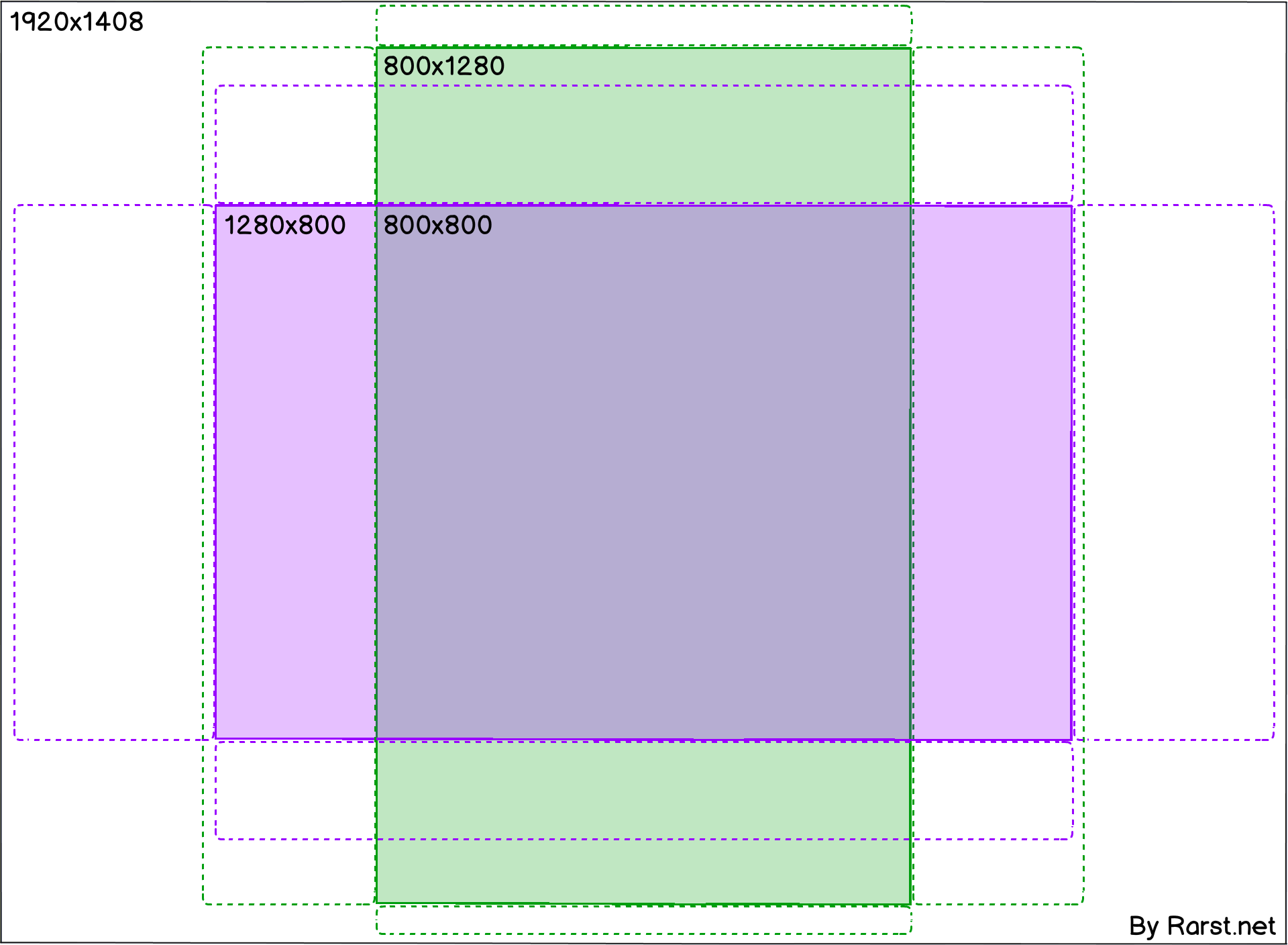
1920x1408 Android wallpaper template
So despite total image size, only 800×800 central section will be visible in both screen modes.
After you find image of sufficient dimensions you can use template to precisely determine how to crop it best, before uploading to device:
Applying Android wallpaper template
And then, when device prompts you to crop, carefully drag out crop area to cover all of image both vertically and horizontally:
Cropping Android wallpaper
As result you will get perfect fit – no rescaling and crisp look of original wallpaper.

Overall

To sum it up – for best results you need large original image with compact central point. Asymmetrical wallpapers won’t work nicely at all, portrait mode won’t even scroll very far to the sides.

Отблагодарить можно через форму справа "Donate" ... )

To reward you via the form on the right "Donate" ... )

:)

воскресенье, 7 октября 2012 г.

Zend Framework: Select query cannot join with another table

Недавно столкнулся с ошибкой "Select query cannot join with another table" при работе с Zend Framework. Текст ошибки сначала просто поставил меня в ступор, поскольку дословно он означает что-то вроде того, что запросы select не могут объединять другие таблицы :) Разумеется это совсем не так и дело оказалось совсем в другом.

Дело в том, что оказывается, в Zend Framework нельзя указывать поля из объединенной таблицы для получения их значений в возвращенной строке.

Например, следующий запрос в Zend Framework не пройдет

$select=$myTable1->select()
->from(array('ft1'=>$myTable1->info('name')),array('ff1'=>'foo'))
->joinLeft(array('ft2'=>$myTable2->info('name')),'ft1.id=ft2.id',array('ff2'=>'foo'));

$rows=$myTable1->fetchAll($select);


Но оказывается можно отключить эту проверку такsetIntegrityCheck(false)


Таким образом, наш предыдущий запрос будет выглядеть так

$select=$myTable1->select()
->setIntegrityCheck(false)
->from(array('ft1'=>$myTable1->info('name')),array('ff1'=>'foo'))
->joinLeft(array('ft2'=>$myTable2->info('name')),'ft1.id=ft2.id',array('ff2'=>'foo'));

$rows=$myTable1->fetchAll($select);

Отблагодарить можно через форму справа "Donate" ... )

To reward you via the form on the right "Donate" ... )

:)

суббота, 6 октября 2012 г.

Разрешения екрана Android правила


Low density (120), ldpi Medium density (160), mdpi High density (240), hdpi Extra high density (320), xhdpi
Smallscreen
QVGA (240x320)


480x640
Normalscreen WQVGA400 (240x400)
WQVGA432 (240x432)
HVGA (320x480) WVGA800 (480x800)
WVGA854 (480x854)
600x1024
640x960
Largescreen

WVGA800** (480x800)
WVGA854** (480x854)

WVGA800* (480x800)
WVGA854* (480x854)
600x1024
Extra Largescreen 1024x600 WXGA (1280x800)†
1024x768
1280x768
1536x1152
1920x1152
1920x1200
2048x1536
2560x1536
2560x1600


I will elaborate more on how exactly does dp convert to px:
If running on hdpi device 150x150 px image will take up 100*100 dp of screen space.
If running on mdpi device 150x150 px image will take up 150*150 dp of screen space.
If running on xhdpi device 150x150 px image will take up 75*75 dp of screen space.

The other way around: say, you want to add an image to your application and you need it to fill 100*100 dp control, you'll need to create different size images for supported screen sizes:
100*100 px image for mdpi
150*150 px image for hdpi
200*200 px image for xhdpi

Получается

mdpi - коэф 1 - 1280х1280 (мин 800)
hdpi - коэф 1,5 - (500) 900х900
xhdpi - коэф - 2 - 2560х1600

Если нет hdpi то андроид умножит mdpi на 1,5 и покажет.


Отблагодарить можно через форму справа "Donate" ... )

To reward you via the form on the right "Donate" ... )

:)

пятница, 5 октября 2012 г.

Разрешения экранов для Android статистика


Отблагодарить можно через форму справа "Donate" ... )

To reward you via the form on the right "Donate" ... )

:)

Current Aurora II Problems Listed (Links to some solutions in first post)


  • Battery Stats showing wrong percentages (stuck at 100%) This is fixed. Check in here http://www.slatedroi...rcentage-stuck/
  • Frequent Wifi drops/ Low connectivity - Soved by performing thopman's mod in here else you should be OK on newer roms.
  • Sometimes tablet wont wake up after going to sleep mode - Temporal solution is to keep wifi always on
  • Constant pop sound from speakers after tablet goes to sleep
  • No bluetooth support (Tablet was advertised as supporting external bluetooth) - DS24, CM10, CM9 roms support external bluetooth.
  • Auto-rotation stops working - Read this post by lexar
  • Many 3G dongles not supported just a few ainol approved ones - Use PPP Widget from the play store to temporarily solve this issue. Needs a rom with root access enabled.
  • SD card error checking: Preparing sd card after every boot. (Sometimes takes about 30mins to finish checking) - Please refer to first post in herehttp://www.slatedroi...o-mount-solved/
  • Отблагодарить можно через форму справа "Donate" ... )

    To reward you via the form on the right "Donate" ... )

    :)

    Долгая проверка внутренний памяти на андроиде


    При загрузки андроида, включается проверка внутренний sd карты на ошибки, это может занят долгое время, при котором память не доступна, или вообще зависнуть. Есть решения по оптимизации карты, в виде форматирования на низком уровне. Такие проблемы встречаются у многих. вот вырезка с забугорного форума.


    Anyone else having trouble with the internal SD card?

    I'm running official 0626 firmware with 51mb root.

    This morning the on boot the tablet gave the notification "Preparing SD card. Checking for errors" and wouldn't change. Obviously while it's doing this you can't access the internal SD, where all my apps are stored.

    I restored to factory default, wiped cache, reflashed the rom, no change. In the end the only answer was to wipe the media partition (the internal SD).

    After the wiped/reflash it went back to normal. I've just spent the past 5 hours setting the tablet back to how it was, downloading games and apps again etc. only for it to happen again. Same "checking for errors" notification that just won't change.

    И решение.

    This problem is solve.
    see below.
    use "SDFormatter".

    SD Formatter formats Flash so that the performance of a Flash can be pulled out to the utmost.
    When formatting a Flash, it recommends strongly using not the format tool attached to an operating system but this SD Formatter.
    Although the format tool attached to an operating system can generally format various recording media containing a Flash, It may not be optimized by the Flash and performance may fall from the case where SD Formatter is used.

    so, procedure is below (now "SDFormatter" is windowsOS only).

    01. Download "SDFormatter" from this link -> HERE
    02. Install "SDFormatter"
    03. Enable "USB Debugging Mode" from Developer Options in settings.
    04. Connect your tablet to PC (USB).
    05. Then, tap the "USB Strage Mode" to connect to PC.
    06. Backup data on INTERNAL_SD card.
    07. Run "SDFormatter".
    08. Specify the drive letter of INTERNAL_SD in SDFormatter and click "(Option)" button.
    09. "FORMAT TYPE" select "FULL OVERWRITE" and set "FORMAT SIZE ADJUSMENT" to "ON" and click "OK"
    10. Now click "FORMAT" and wait for the procedure to complete. (Can take approximately 1 hour 40 minutes)
    11. After format is completed you can recopy the backup files back onto the INTERNAL_SD
    12. HAVE FUN !!

    probably this act is effective in all the China tablets.
    this storage faster effect is in all the tablets I own.


    Отблагодарить можно через форму справа "Donate" ... )

    To reward you via the form on the right "Donate" ... )

    :)

    Прошивка Ainol NOVO 7 Aurora II / Elf II

    Отблагодарить можно через форму справа "Donate" ... )

    To reward you via the form on the right "Donate" ... )

    :)

    друзья )

    Сохраняйте и делитесь желаниями, и не забывайте о важных датах!